 Munshi
Managing udhaar digitally means recording every credit and every payment in an app instead of a notebook, so that each customer’s balance and your total are always correct. A digital khata app (also called a customer credit tracking app or udhaar app) does the adding for you, shows who owes you at a glance and can remind customers on WhatsApp. This guide shows how to set it up in an afternoon.
What a digital khata app should do
Not every app suits a Pakistani shop. Look for these, in this order of importance:
- One-tap entries. If it takes a minute, you will not do it at a busy counter.
- Offline first. Power cuts and weak signal should never lose a sale.
- Urdu and English, including right-to-left Urdu and Urdu statements.
- Plain-word balances such as “Ali owes you Rs 3,500”.
- WhatsApp reminders you control.
- Privacy and backups, so your records are safe and not used for ads.
We go through this checklist in more detail in the best free khata app in Pakistan: what to look for.
Set up your digital khata in five steps
- Add your customers. Tap Add customer and enter a name and phone number. You can pick the number straight from your contacts, and Munshi warns you about a duplicate.
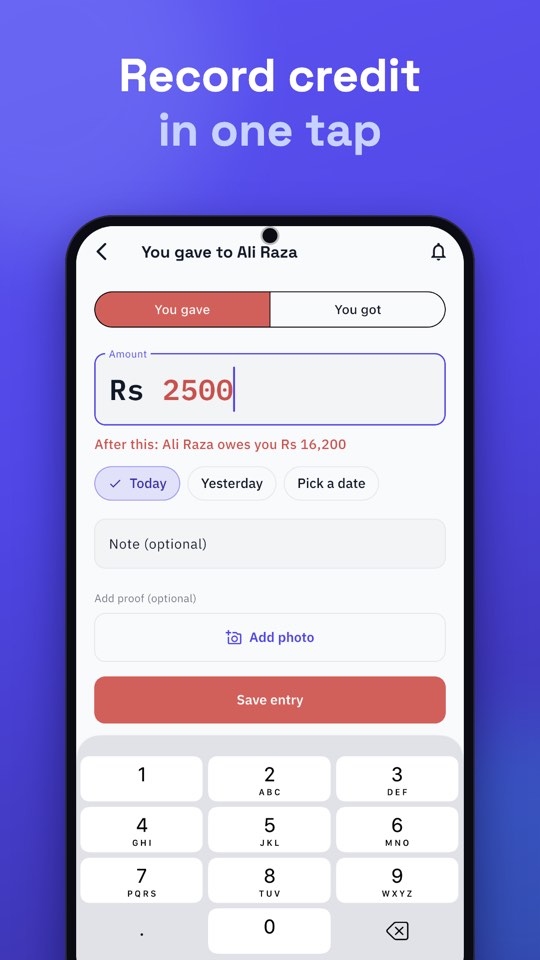
- Enter what they owe. For each person with an old balance, record it once. You gave means they owe you; You got means they paid.
- Record every sale and payment. Open the customer, tap You gave or You got, type the amount, and add an optional note or photo.
- Check who owes you. Home shows You will get and You will give. Reminders lists every overdue balance.
- Follow up and back up. Send reminders on WhatsApp, and connect Google Drive for an extra copy of your records.
Read balances the easy way
Munshi writes balances in plain words, with colour to match: red is money you will get, green is money you will give. You do not need to know debit from credit to see that Ali Raza owes you Rs 13,700.
Keep it accurate in seconds a day
A digital khata is only as good as its habits. Record at the moment of the sale, one person gets one account, and compare cash with your Cash Book every evening. The details are in seven small habits of a khata that always balances.
Collect what you are owed
Seeing udhaar is the first step. Collecting it is the second. Use due dates, a weekly routine and short WhatsApp messages. Our guides on getting paid faster and polite reminder messages cover both.
Is udhaar safe on a phone?
Yes, if you take three precautions. Turn on App Lock so a PIN is needed to open the app. Keep a backup: Munshi saves a copy on the phone once a day, and you can add a copy in your own Google Drive. And choose an app that never shares your customers’ names, numbers or amounts with advertisers, as we explain in why Munshi is free.
Moving from a paper register
If your udhaar is still in a notebook, the switch is easier than it looks. Read how to move from a paper khata to a mobile app for a step-by-step plan.