 Munshi
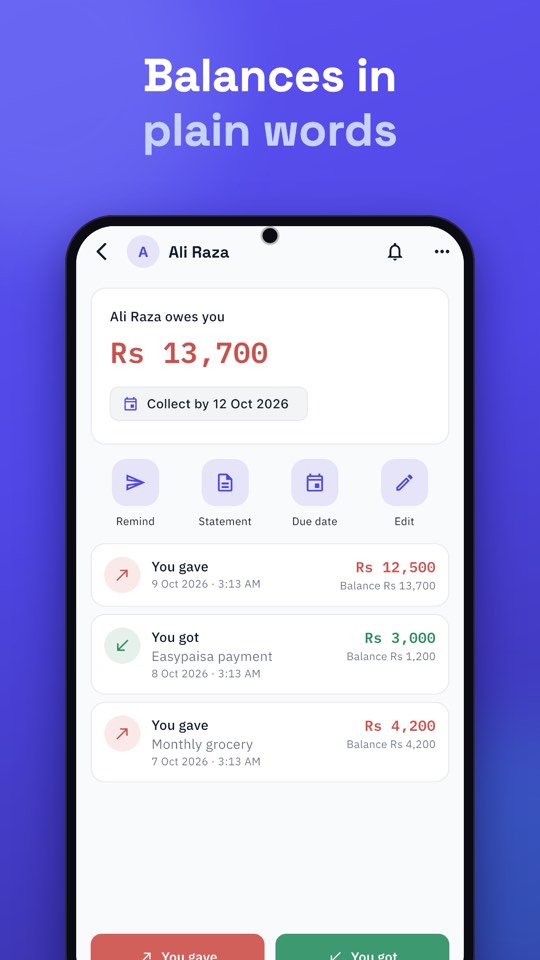
A tailor or boutique can keep a clear khata by recording the full price of each order as You gave and every advance as You got, so the balance always shows what is left to collect at delivery. Add the order number and delivery date in the note, and a photo of the design or measurements. The same method works for any custom work paid in stages.
Why advances need their own record
Custom work is paid in parts: a booking amount, maybe a second advance, and the rest on delivery. Without a record, disputes follow: “I already gave you Rs 3,000”, “the price was less”, “you promised it by Friday”. A dated entry for the price and for each advance ends those conversations.
How to record an order step by step
- Open the customer, or add a new one with name and phone number.
- Record the order. Tap You gave and enter the full price. In the note write the order number, what it is (for example “bridal dress, 3 pieces”) and the delivery date.
- Record each advance. Tap You got and enter the amount, with a note such as “advance 1, cash” or “advance 2, Easypaisa”.
- Attach a photo or voice note. A photo of the design, fabric or measurements stays with the entry, and uploads later if you are offline.
- Check the balance: it now reads what the customer still owes you.
On delivery day
The day before, open Reminders and send a short WhatsApp message with the balance due. Munshi opens WhatsApp with the message ready, and you press Send. When the customer collects and pays, tap You got for the final amount. The balance reaches zero, and the account is settled.
Assalam o Alaikum, aap ka order kal tayyar hai. Baqi raqam Rs 4,500 hai. Shukriya.
When the customer changes the order
Customers change their mind. If the price goes up or down, edit the entry or add a new entry for the difference, and write the reason in the note. Do not change entries quietly: tell the customer, and share a statement if needed. See how to fix a wrong entry.
Unclaimed orders and old balances
Use the collection date to remember who has not collected. A weekly look at your oldest balances shows unclaimed work and unpaid amounts. The approach in getting paid faster as a small business applies directly.
What Munshi does not do
Munshi records money, not measurements or stock. Keep your measurement register as you do now, and use the photo on the entry as a pointer. It will, however, make sure the money side is never in doubt. To move your existing customers in, see how to move from a paper khata to an app.
A full example: one bridal order from booking to delivery
Seeing the whole sequence makes the method concrete. Take a bridal dress with an agreed price of Rs 36,000:
- Booking (1 March). You tap You gave and enter Rs 36,000, with the note “Order 114, bridal dress, delivery 28 March”. The customer’s balance reads Rs 36,000 owed to you.
- First advance (1 March). You tap You got and enter Rs 10,000, note “advance 1, cash”. The balance is now Rs 26,000.
- Second advance (15 March). You tap You got for Rs 12,000, note “advance 2, Easypaisa”. The balance is Rs 14,000.
- Fitting (22 March). The customer asks for an extra embroidered border at Rs 3,000. You add a new You gave entry of Rs 3,000 with the note “Order 114, extra border”. The balance is Rs 17,000.
- Delivery (28 March). The customer collects the dress and pays Rs 17,000. You tap You got, and the balance reaches zero. The account is settled, and the story of the order is in the entries.
Every step has a date, an amount and a reason. If a question comes up later, you can answer it in seconds.
Handling common situations
- The customer cancels. Decide your policy on advances before it happens, then record it plainly. If you keep part of the advance for work already done, record the refund as You gave with a note. The balance then shows the real position.
- The price changes. Do not overwrite the original entry. Add a new entry for the difference with a note explaining why. That way the history shows both the original agreement and the change.
- A rush order. Add “rush” to the note and the delivery date. It makes your weekly review easier.
- Alterations. Treat small alterations as their own short orders with their own note, or add them to the original order’s account if they are free; a note such as “free alteration” still leaves a record.
- A customer who does not collect. Use the collection date to keep the pickup visible, and send a gentle reminder. See how to send payment reminders on WhatsApp.
Photos and voice notes that save time
Attach a photo of the design to the order entry, and, if you wish, a photo of the fabric. For a quick instruction from the customer, record a voice note on the entry. Both can be added offline and upload later, so a weak signal in a market does not stop you. The point is not to build a digital archive; it is to avoid the argument that begins “that is not what I asked for”.
Running more than one stream of work
Many tailors and boutiques also sell ready-made items or fabric. If the money behaves differently, such as cash sales of fabric versus advance-based orders, consider keeping them as separate businesses in Munshi, each with its own customers, Cash Book and expenses. It keeps your order balances from being mixed with counter sales. See how to manage multiple businesses in one app.
A weekly review for custom work
- Open your list of customers with a balance and sort mentally by delivery date.
- Check who has not collected a finished order and send a reminder.
- Check advances: is any order running without one?
- Compare the Cash Book with the drawer, as in cash in and cash out: how to choose a cash book app.
This is general business guidance, not legal advice. If a disagreement over an advance becomes serious, a statement with every dated entry is your best evidence; see how to settle a dispute with proof.