 Munshi
Munshi is a free khata app for Android and iPhone that records customer and supplier credit, cash, bank accounts and expenses, works offline, and runs fully in Urdu and English. This review comes from the team that makes it, so it is not neutral. We try to be useful instead: what Munshi does well, what it deliberately does not do, and the kind of shop it fits.
What Munshi is
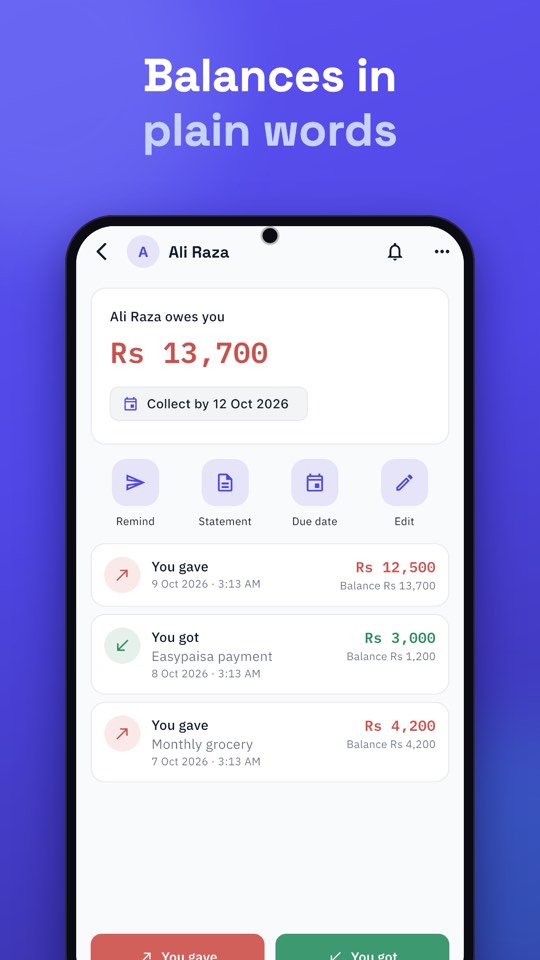
Munshi replaces the paper khata. For every customer or supplier you record You gave and You got, and Munshi keeps the balance in plain words, such as “Ali Raza owes you Rs 13,700”. Around that sit a daily Cash Book, Bank Book, expenses with categories you can rename, and reports for any dates as PDF or Excel. You can keep up to five businesses on one account.
What it does well
- Offline first. Entries save on the phone at once and sync when you are back online. Photos and voice notes wait and upload later.
- Real Urdu. The whole app switches to right-to-left Urdu, and so do the statements and reminders you share.
- One tap to record credit. It is quick enough to use at a busy counter.
- WhatsApp reminders you control. Munshi opens WhatsApp with the message written; you read it and press Send. Nothing goes out automatically.
- Backups. A daily copy on the phone, cloud sync linked to your phone number, and an optional copy in your own Google Drive.
- Mistakes are recoverable. Deleted ledger, cash, bank and expense entries wait 14 days in the Recycle bin.
- App Lock. A PIN, with optional fingerprint or Face ID.
What it does not do
Being clear about limits saves you time, so here they are:
- No invoicing. Munshi does not produce invoices or bills for customers.
- No stock or inventory. It does not track items, quantities or reorder levels.
- No barcode billing or point-of-sale.
- No staff accounts or permissions. It is one account for one owner, usable on more than one phone.
- Phones only. There is no desktop or web version.
- Still arriving: restoring a backup file and importing customers from a sheet are in testing, not yet released.
If your main need is billing and stock, you will want a different kind of tool, perhaps alongside Munshi. If your main need is knowing who owes whom and where your cash went, that is exactly what Munshi is for.
How it makes money, and what that means for you
Munshi has no subscription. A few small ads, marked “Ad”, pay for the servers. They never appear while you add or edit an entry, sign in, unlock the app or send a reminder. PDFs of this month and last month are free; longer dates and Excel files open after a short ad you choose to watch, and if no ad can load the file is made anyway. Your customers’ names, numbers and amounts are never shared with advertisers. More in why Munshi is free.
Who Munshi is for
| A good fit if you… | Look elsewhere if you… |
|---|---|
| give credit and want to know who owes you | mainly need invoices and tax billing |
| want Urdu, or both languages | need stock levels and barcode scanning |
| have weak internet or power cuts | need separate logins for staff |
| run one or several small businesses from a phone | need a desktop program |
| want your cash book, bank and expenses in the same app | need full accounting with tax filing |
Our verdict
Munshi is a focused tool. It does a small number of jobs, the ones a Pakistani shop does every day, and tries to do them simply, offline and in Urdu. Try it with five real customers and a day of entries; the free version is the full app. If it fits, it will pay for itself in balances you can trust. If you are comparing options, use our buyer’s checklist, and to understand why we built it, read why we built Munshi.