 Munshi
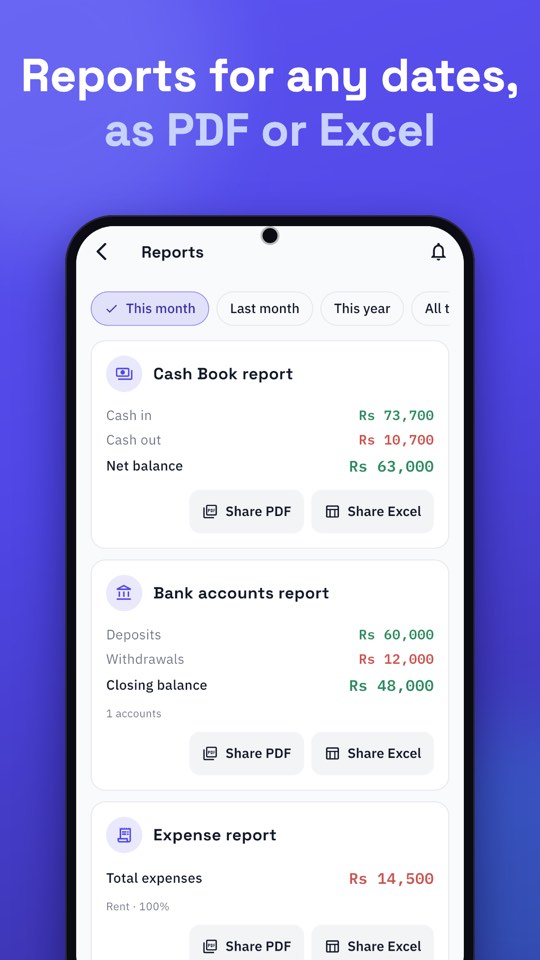
Munshi creates business reports in both Urdu and English: a Cash Book report, an Expense report, a Profit & Loss report and a Bank accounts report, for any dates, shared as PDF or Excel. The language follows the app setting at the moment you export, so you can make an Urdu report for your team and an English one for your accountant from the same records.
Why bilingual reports matter
Business in Pakistan moves between languages. Your helpers and customers may read Urdu most easily. Your accountant, bank or a supplier may expect English. A tool that only produces one language makes someone retype or translate. Producing either from the same data saves time and mistakes.
The reports Munshi can create
- Cash Book report: cash in and out for the dates you choose, with totals.
- Expense report: spending by category, with a total.
- Profit & Loss: an estimate of profit for the dates, from what you have recorded.
- Bank accounts report: deposits and withdrawals for your accounts.
- Customer and bank statements: per person or account, with a running balance.
How to create a report in Urdu or English
- Choose the language. Go to Settings → Language and pick Urdu or English.
- On Home, tap Reports.
- Pick the dates: this month, last month, this year, all time, or your own range.
- Open the report you need: Cash Book, Expenses, Profit & Loss or Bank accounts.
- Share it as a PDF or an Excel file, straight to WhatsApp, email or wherever you like.
Urdu reports are laid out right to left, with numbers and Rs amounts displayed correctly. Switch the app language and repeat to produce the same report in the other language.
Which format and language for whom?
| You are sending to… | Suggested |
|---|---|
| Your staff or family | Urdu PDF |
| A customer | Urdu or English PDF statement, whichever they prefer |
| Your accountant | English Excel, so they can sort and total |
| A bank or supplier | English PDF |
How to read each report
- Cash Book report: start with the closing balance, then look at the biggest cash outs. Does cash in match what you expect from your sales?
- Expense report: the category totals show where money goes. The top two or three categories are where savings are possible.
- Profit & Loss: treat it as an estimate. It is only as complete as your recorded entries, so check that your sales and expenses are all in before you rely on it.
- Bank accounts report: use it to match your own records against the bank’s statement.
Common questions
Will the Urdu numbers and amounts look right?
Yes. Munshi draws Urdu text carefully so letters join correctly and “Rs” amounts read the right way round, even inside Urdu sentences. The PDF looks the same on every phone.
Can I choose my own dates?
Yes. Besides this month, last month, this year and all time, you can pick any range, such as one quarter for your accountant.
Can I keep both language versions?
Export once in each language and save both. Nothing is changed in your records by switching language.
What does it cost?
PDFs for this month and last month are free. A PDF for longer dates and any Excel file open after a short ad that you choose to watch; those buttons are marked “Ad”. If no ad can load, the file is made anyway. We explain the reasoning in why Munshi is free.
Getting good reports
A report is only as good as the entries behind it. Record at the moment, use categories, and keep personal and business money apart. See cash in and cash out: how to choose a cash book app and how to track business expenses in Pakistan. For customer statements in particular, read how to create a customer statement in Urdu.